
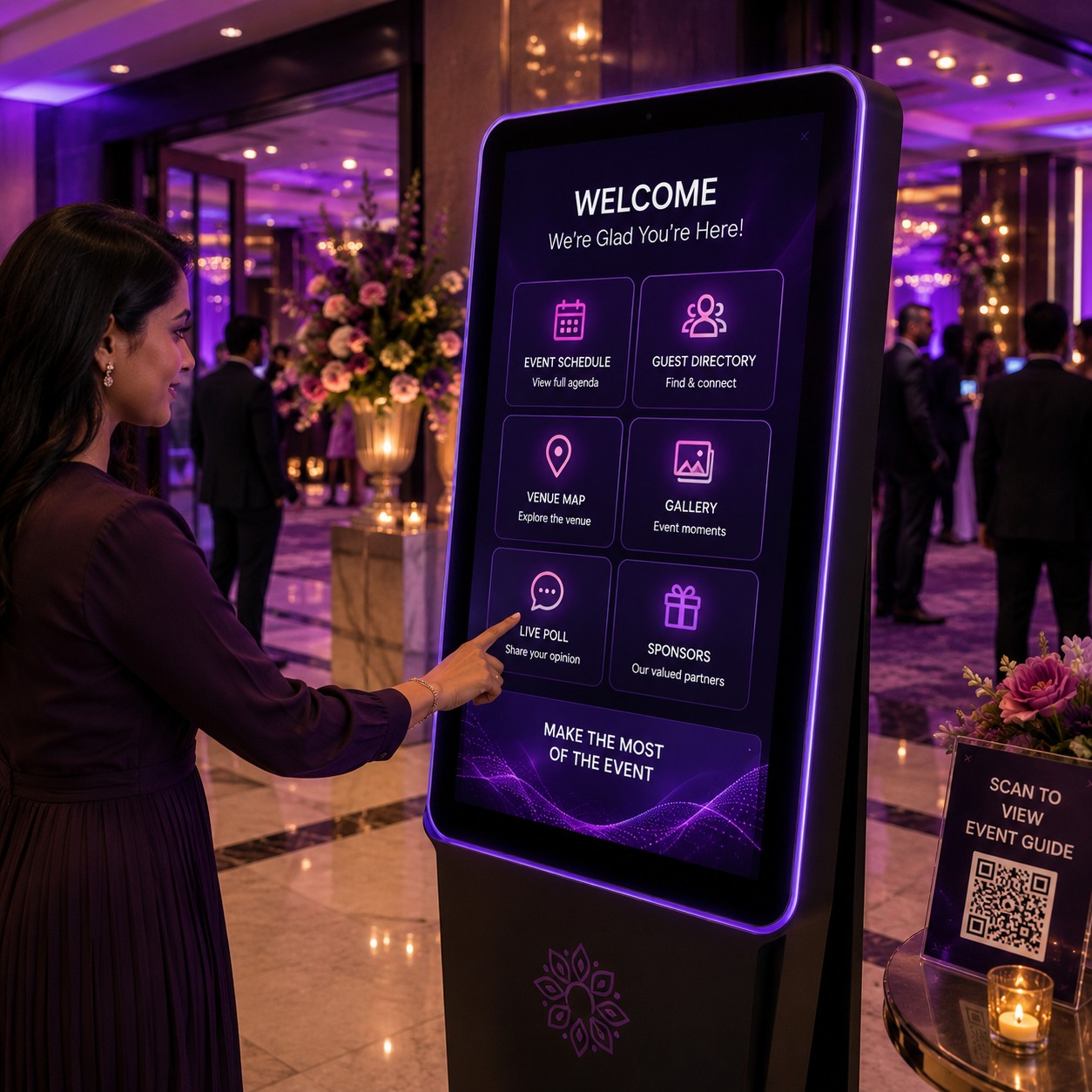
Interactive Touch Screen Information Kiosks
Interactive touch screen kiosks provide self-service directories, venue maps and digital navigation to help trade show visitors find exhibitors, halls and facilities.
Explore Digital & Tech-Enabled Event Experiences




Explore Other Experiences

















Explore by Occasion






Interactive Touch Screen Information Kiosks and Digital Navigation for Trade Shows
◆Trade shows can bring together large numbers of exhibitors, visitors, products, sessions and venue facilities across multiple halls or floors. Interactive touch screen information kiosks provide visitors with a self-service way to access event information and navigate the exhibition space.
A kiosk can display an exhibitor directory, venue map, event schedule, booth information and other approved content. Depending on the system, visitors can search for an exhibitor, select a destination and follow digital navigation instructions.
The Art of Interactive Event Kiosks
Interactive kiosks combine a touch screen interface with event information and digital navigation features. Visitors can interact directly with the screen instead of relying entirely on printed directories or staff assistance.
The content and functionality depend on the kiosk software, screen hardware and event information provided by the organiser.
Self-Service Directory
A digital directory can list exhibitors, sponsors, speakers, sessions and other trade show information. Visitors can search or browse the directory using the kiosk's touch interface.
Directory categories should be organised clearly so that users can find relevant information quickly.
Exhibitor Directory
An exhibitor directory can provide company names, booth numbers, categories and other approved information. Selecting an exhibitor can display additional details where supported.
The exhibitor database should be updated before and during the trade show when changes occur.
Venue Maps
Interactive venue maps provide a visual representation of exhibition halls, entrances, meeting rooms, stages, registration counters and other facilities.
Visitors can select locations on the map to explore the venue layout.
Digital Navigation
Digital navigation helps visitors identify routes between their current location and a selected destination. Depending on the system, the kiosk may display a visual route or directional instructions.
The navigation information should reflect the actual venue layout and accessible routes.
Trade Show Wayfinding
Wayfinding kiosks can reduce the need for visitors to search through printed floor plans. A visitor can search for an exhibitor or facility and use the resulting map to understand where it is located.
Large exhibitions with multiple halls can particularly benefit from structured digital wayfinding.
Interactive Exhibition Maps
Interactive maps can allow users to zoom, select halls, explore booth areas and locate event facilities.
Map design should remain simple enough for visitors unfamiliar with the venue.
Booth Location Finder
Visitors can search for a company and receive its booth location. The kiosk can then display the relevant exhibition hall and booth area where supported.
Booth information should be synchronised with the latest exhibitor layout.
Exhibitor Search
Search functionality allows visitors to enter a company name or other supported keyword. The system can return matching exhibitors and their associated booth information.
Search should accommodate the naming conventions used in the official exhibitor database.
Product and Category Search
A trade show kiosk can organise exhibitors according to product categories or industry sectors. Visitors can browse a category and identify companies exhibiting relevant products or services.
Category information should be maintained by the event organiser.
Sponsor Information
Sponsors can be included in the digital directory or map according to the event's sponsorship arrangements. Selecting a sponsor can display approved company information or booth details.
The presentation should follow the organiser's branding requirements.
Event Schedule
Information kiosks can provide schedules for seminars, demonstrations, presentations and other trade show activities.
Visitors can browse sessions by time, location or category where the system supports these filters.
Session Location Finder
A visitor can select a seminar or presentation and identify the room or stage where it is taking place. The kiosk can then provide the relevant venue information.
Schedule changes should be updated promptly.
Speaker Directory
Where applicable, a kiosk can provide information about speakers, presenters or industry experts participating in the trade show.
Speaker profiles should use approved event information.
Meeting Room Finder
Trade shows may include meeting rooms, networking areas and business lounges. An interactive kiosk can help visitors identify these spaces and their locations.
Room availability information requires integration with an appropriate scheduling system if real-time status is required.
Registration Information
A kiosk can provide information about registration counters, badge collection areas and entry points. This can help visitors locate registration services after entering the venue.
The information should reflect the actual event-day arrangement.
Visitor Information
Kiosks can answer common questions about event facilities, opening hours, hall layouts, services and programme information.
Frequently requested information should be easy to locate from the main interface.
Facility Locator
A venue map can identify facilities such as restrooms, elevators, escalators, food areas, first-aid points and information desks.
Facility information should be verified against the venue's operational layout.
Accessible Navigation
Digital navigation can help visitors identify accessible entrances, lifts and routes where this information is available.
Accessibility information should be verified with the venue before publication.
Food and Beverage Locations
Trade show kiosks can identify cafés, restaurants, refreshment counters and other food-service areas within the venue.
The displayed locations should match the event-day setup.
Parking and Entrance Information
Visitors can use a kiosk to find entrances, parking information and access points where these details are included in the event directory.
External navigation may require separate mapping or transport information.
Digital Event Directory
A digital directory can replace or supplement printed exhibition guides. Changes to exhibitor information can be reflected digitally without reprinting the complete directory, subject to the kiosk's content-management system.
Organisers should maintain a clear process for updating information.
Multi-Hall Navigation
Large trade shows may occupy several exhibition halls. Interactive kiosks can help visitors identify the correct hall before navigating to a particular booth.
The map should clearly distinguish halls and connecting routes.
Floor Plan Navigation
A floor plan can show booth numbers, aisles, stages and facilities. Visitors can interact with the plan to locate destinations.
Accurate floor-plan data is essential for useful navigation.
Digital Booth Profiles
A booth profile can include company information, product categories, booth number and other approved details. This can give visitors additional context before they visit an exhibitor.
Profile content should be prepared in a consistent format.
QR Code Integration
Some kiosks can display QR codes that visitors scan with their smartphones. The code may provide an exhibitor page, map location, event information or other digital content where supported.
QR destinations should be tested before the trade show.
Mobile Handover
A kiosk can sometimes transfer selected information to a visitor's smartphone through a QR code or other supported method. This can allow visitors to continue using the information away from the kiosk.
The available mobile features depend on the kiosk platform.
Touch Screen Interface
Touch screens allow visitors to select buttons, maps, categories and search fields directly. The interface should use appropriately sized controls for public use.
The screen should be positioned at a comfortable viewing and interaction height.
Multilingual Information Kiosks
International trade shows may provide event information in multiple languages. A multilingual kiosk can allow visitors to select their preferred language where supported.
Translations should be reviewed before the event, particularly for exhibitor names and technical terms.
Self-Service Visitor Assistance
A kiosk can provide information without requiring a staff member to answer every routine navigation question. This can complement, rather than replace, staffed information desks.
Staff support should remain available for complex visitor requirements.
Real-Time Event Updates
If the kiosk is connected to a suitable content-management system, organisers may be able to update schedule changes, booth information or announcements during the trade show.
Update frequency depends on the underlying software and network connection.
Trade Show Announcements
Digital kiosks can display approved event announcements, reminders or notices. These can be used to communicate programme changes or direct visitors to specific areas.
Announcements should be managed by authorised event staff.
Lead and Visitor Engagement
Some kiosks may offer interactive exhibitor content or promotional information. If visitor data collection is enabled, the process should clearly explain what information is being collected.
The kiosk's primary navigation function should remain easy to access.
Promotional Content
Exhibitors or sponsors may be presented through approved promotional panels or directory listings. Promotional content should not make essential navigation information difficult to access.
The balance between commercial content and visitor assistance should be planned in advance.
Accessibility and Usability
Public kiosks should consider readable text, clear navigation controls and suitable contrast. The physical placement should also allow appropriate access where possible.
Accessibility features vary between kiosk hardware and software.
Kiosk Hardware
Interactive information kiosks can use floor-standing, wall-mounted or other touch-screen configurations depending on the venue.
Hardware should be selected according to screen size, viewing distance, expected visitor volume and installation requirements.
Kiosk Connectivity
Digital directories and maps may require network connectivity for content updates and certain interactive functions.
Connectivity should be tested throughout the planned kiosk locations.
Technical Support
Technical support can address screen, software, connectivity and content issues during the trade show. A support contact should be identified before the event.
High-traffic exhibitions may benefit from proactive monitoring of kiosk systems.
Kiosk Content Management
A content-management system can allow authorised staff to update exhibitor listings, schedules, announcements and other information.
Content ownership and update responsibilities should be defined before the event.
Kiosk Testing
The complete visitor journey should be tested before opening the trade show. This includes searching for exhibitors, opening maps, finding routes, checking schedules and using QR codes.
Testing should use the final venue layout and exhibitor information wherever possible.
Planning Your Interactive Touch Screen Kiosks
Begin by identifying the information visitors need most frequently. Build the kiosk directory around exhibitors, halls, maps, sessions, facilities and other essential event information.
Next, prepare accurate venue maps and exhibitor data, select kiosk hardware locations and configure the interface. Test the navigation experience with people unfamiliar with the venue before the trade show opens.
Booking Interactive Information Kiosk Services
When arranging interactive touch screen kiosks for a trade show, consider self-service directories, exhibitor search, venue maps, digital navigation, booth finding, session schedules, facility locations, QR codes, multilingual content, accessibility, real-time updates, connectivity and technical support.
A professional event technology provider can deploy interactive kiosks around the venue's layout and visitor-information requirements. Organisers should confirm screen hardware, software capabilities, map accuracy, content management, network requirements and onsite support before deployment.
Frequently Asked Questions
1. What are interactive touch screen information kiosks?
They are self-service digital stations that allow trade show visitors to search for exhibitors, view venue maps, find facilities and access event information.
2. Can a kiosk help visitors find exhibitor booths?
Yes. An exhibitor directory can provide booth numbers and locations, with an interactive map or route where supported.
3. Can trade show kiosks display venue maps?
Yes. Interactive venue maps can show exhibition halls, booths, stages, meeting rooms and other facilities.
4. Can kiosks provide digital navigation?
Yes. Depending on the software, visitors can select a destination and receive a visual route or directional information.
5. Can event schedules be displayed?
Yes. Trade show kiosks can display approved schedules for seminars, presentations, demonstrations and other activities.
6. Can exhibitors update their information?
This depends on the kiosk's content-management workflow. Organisers or authorised administrators can update exhibitor information where the platform supports it.
7. Can kiosks use QR codes?
Yes. QR codes can provide links to exhibitor profiles, event information, maps or other digital resources where supported.
8. Can the kiosks support multiple languages?
Some systems support multilingual interfaces. Translated event and exhibitor content should be reviewed before publication.
9. Do interactive kiosks require internet connectivity?
Some functions and content updates require connectivity. The exact requirements depend on the kiosk software and deployment model.
10. What should I consider when booking interactive information kiosks?
Consider screen hardware, self-service directories, exhibitor search, venue maps, navigation, schedules, QR integration, multilingual support, accessibility, content updates, connectivity and technical support.