
+91-8681086818
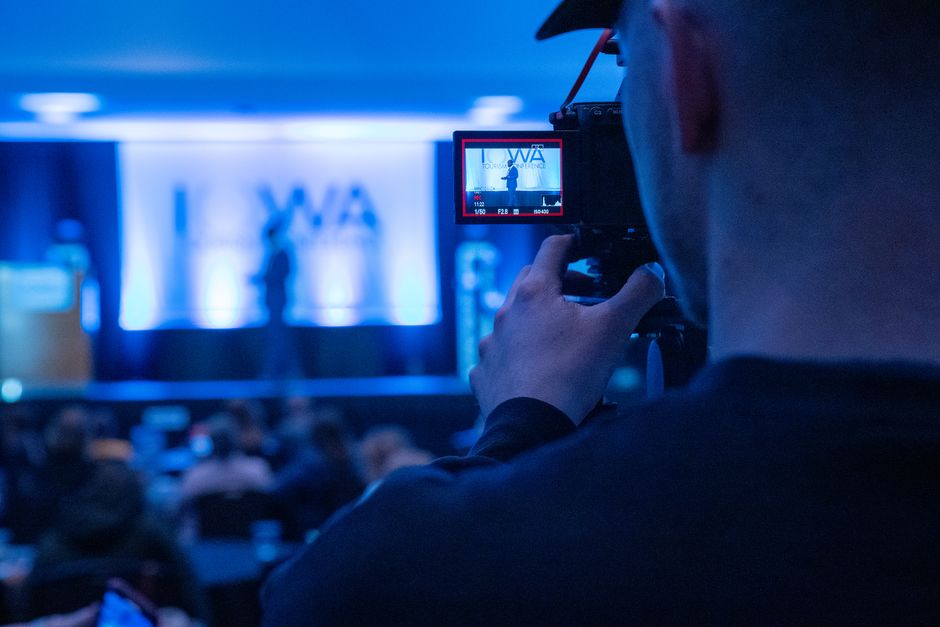
Professional conference live streaming Chennai setup with multi-camera production at a corporate event venue
Wedding Planning

Conference Live Streaming Chennai: Complete Guide 2026

Everything you need to know about corporate event live streaming services in Chennai — setup, costs, and best practices

2026-06-17By Happiffie Editorial Team10 min read
⚡ Quick Answer

Conference live streaming in Chennai involves broadcasting a corporate event — seminars, product launches, AGMs, or town halls — to remote audiences via platforms like YouTube Live, Zoom Webinar, or private streams. Professional services in Chennai typically cost ₹15,000–₹1,50,000+ depending on camera count, platform, duration, and crew size. Booking 4–6 weeks in advance is recommended for peak season (October–March).

Conference live streaming in Chennai has shifted from a luxury add-on to a business-critical requirement. With corporate hubs spread across Old Mahabalipuram Road (OMR), Anna Salai, and Guindy, Chennai hosts thousands of conferences, annual general meetings, product launches, and leadership summits every year — and a growing share of attendees now participate remotely from Bangalore, Mumbai, Delhi, and overseas offices. Conference Live Streaming Chennai solutions bridge that physical gap, letting every stakeholder attend in real time regardless of geography.

Whether you are organising a 50-person internal town hall at a Guindy hotel or a 2,000-delegate industry summit at a Chennai convention centre, the production approach changes significantly. Corporate event live streaming Chennai demands reliable internet infrastructure, multi-camera coverage, professional encoding hardware, and experienced crew — all of which are now available locally. At the same time, verified AV and streaming vendors vary widely in quality and pricing, making upfront research essential. This guide covers every dimension of hybrid event broadcasting Chennai — from choosing the right setup and understanding realistic INR costs to avoiding the most common streaming failures we have seen at live events across South India.

What Is Conference Live Streaming and Why Does Chennai Need It?

Conference live streaming is the real-time broadcast of a physical event — panel discussions, keynote addresses, workshops, or award ceremonies — to an online audience through a chosen platform. In the Chennai context, this typically means encoding a multi-camera feed from a conference hall, encoding it at the venue, and transmitting it over the internet to viewers on YouTube Live, Vimeo, Zoom Webinar, Microsoft Teams, or a private white-label platform.

Chennai's role as a major IT and manufacturing hub means its events carry national and international significance. A product launch on OMR may need to reach dealer networks in Coimbatore, Hyderabad, and Singapore simultaneously. An NGO summit in Mylapore may include diaspora participants from the United States. Corporate event live streaming Chennai services have matured precisely because local demand now comes from IT majors, pharma companies, automobile manufacturers, academic institutions, and government bodies alike.

Industry data from 2023–24 suggests that hybrid events — those with both in-person and online components — now account for roughly 45% of all mid-to-large corporate events in tier-1 Indian cities. Chennai mirrors this national trend. Investing in professional event services for Chennai corporate events is no longer optional; it is the baseline expectation from modern stakeholders. A dropped stream or pixelated video reflects directly on your brand, making the choice of streaming partner one of the most consequential decisions in your event planning process.

Beyond brand perception, accessible streaming also drives measurable ROI. Events that stream online typically report 30–60% more total audience reach than purely in-person equivalents, and recorded streams serve as reusable content assets for months after the event.

What Equipment and Crew Does a Professional Stream Require?

A production-grade Conference Live Streaming Chennai setup is layered: capture, switching, encoding, and delivery are four distinct stages, each requiring specialist gear. Understanding this architecture helps you evaluate vendor proposals accurately and avoid being undersold a substandard rig.

Cameras: Entry-level single-camera setups use one PTZ (pan-tilt-zoom) camera for small boardroom webinars. Mid-range productions use two or three broadcast-grade cameras — typically a wide shot, a speaker close-up, and a roving handheld for Q&A segments. Large-scale hybrid event broadcasting Chennai productions deploy four to six cameras, including audience reaction shots. Each additional camera adds ₹5,000–₹12,000 to the day rate depending on model and operator.

Vision Mixer and Encoder: A hardware switcher (such as ATEM Mini Pro or Blackmagic ATEM series) allows a director to cut between camera angles in real time. The encoder converts the switched output to a compressed stream (H.264 or H.265) at 4–8 Mbps for reliable delivery. Professional AV setup for corporate events should always include a hardware encoder rather than relying solely on laptop-based software encoding, which is vulnerable to CPU spikes.

Audio: Poor audio is the single most common failure point we have seen at Chennai conferences. A robust setup includes wireless lapel microphones for speakers, a dedicated audio mixer, and a clean mix feed sent separately to the stream — not a room microphone. Audience Q&A requires a roving wireless handheld or a confidence monitor mic system.

Crew: A professional team for a 200-person conference typically includes a stream director, two camera operators, a sound engineer, and a technical producer monitoring the live event production quality from a control station backstage. Smaller webinar production Chennai setups for 50 or fewer attendees may be handled by a two-person crew with PTZ cameras.

Redundancy is non-negotiable for high-stakes events. Dual encoder setups, backup internet connections (4G LTE failover), and spare camera heads add roughly 20–25% to equipment cost but protect against catastrophic failures.

How Much Does Conference Live Streaming in Chennai Cost?

Conference Live Streaming Chennai pricing spans a wide range because the variables — crew size, camera count, platform, duration, and post-production requirements — multiply quickly. Below are realistic INR benchmarks based on current market rates in Chennai.

Basic Webinar Setup (1 camera, 1 operator, up to 4 hours): ₹15,000–₹30,000. Suitable for internal town halls, training sessions, or board meetings broadcast to up to 100 online viewers. This tier uses software-based encoding and a standard Zoom or Google Meet stream.

Mid-Range Corporate Stream (2–3 cameras, switcher, dedicated audio, up to 8 hours): ₹45,000–₹90,000. The most common tier for product launches, annual conferences, and panel discussions. Includes hardware encoder, a clean graphics overlay (lower thirds with speaker names), and delivery to YouTube Live or a private platform.

Full Production Hybrid Event (4–6 cameras, multi-crew, graphics, backup internet): ₹1,00,000–₹2,50,000+. Appropriate for AGMs, industry summits with 500+ in-person delegates, and events requiring simultaneous multilingual audio tracks. Virtual conference streaming Chennai at this tier often includes a dedicated streaming engineer, custom motion-graphics package, and a post-event edited highlight reel.

Peak-season surcharges (October–March in Chennai) can add 15–25% to base rates. Events at venues in OMR or Perungudi with poor internet infrastructure may also incur ₹8,000–₹20,000 additional charges for dedicated bonded 4G or fibre-on-demand connectivity. Off-peak bookings (April–September) typically offer better rates and greater vendor availability. Compare streaming packages and get competitive quotes to ensure you receive accurate, vendor-specific pricing rather than generic estimates.

Multi-camera corporate event coverage for a full-day conference is the fastest-growing request category we see from Chennai corporates, so book your preferred vendor at least 4–6 weeks in advance.

Choosing the Right Streaming Platform for Your Event

Platform selection is one of the most consequential decisions in any Conference Live Streaming Chennai project, yet it is often made last. The right platform depends on your audience size, access control needs, branding requirements, and whether you need viewer analytics post-event.

YouTube Live is the default choice for public-facing events where maximum reach matters. It is free to use, handles unlimited concurrent viewers, and indexes recorded content for long-term SEO value. The limitation: it is a public platform, so internal corporate events should never be broadcast here without careful access management.

Zoom Webinar and Zoom Events are ideal for interactive webinar production Chennai sessions where audience Q&A, polls, and registration management are priorities. Zoom supports up to 10,000 view-only attendees on its largest tier, though costs scale with licence size. It integrates neatly with enterprise IT environments common in Chennai's IT corridor.

Microsoft Teams Live Events suits organisations already on the Microsoft 365 ecosystem. Its end-to-end encryption and Azure-based CDN delivery make it the go-to for finance, legal, and government conferences where data residency matters.

Private RTMP / White-Label Platforms: For events requiring custom branding, ticketed access, or integration with a CRM, white-label streaming platforms (Vimeo Premium, Kaltura, Dacast) accept a standard RTMP feed from any hardware encoder. This is the preferred approach for hybrid event broadcasting Chennai productions where the event owner wants full control over the viewer experience — including removing distracting social comments.

Platform latency matters for interactive sessions. YouTube Live has a 15–30 second delay; Zoom operates at under 2 seconds. For conferences with live audience voting or real-time Q&A, ultra-low-latency platforms are worth the additional cost. A good event planning FAQ resource can help you match platform capabilities to your specific format before you brief vendors.

What Are the Key Technical Challenges at Chennai Venues?

Chennai's venue landscape ranges from world-class convention centres like the Chennai Trade Centre (Nandambakkam) to boutique hotel ballrooms and independent banquet halls. Each environment presents distinct challenges for Conference Live Streaming Chennai production teams.

Internet Reliability: This is the most cited pain point. Many older hotel properties in areas like T. Nagar and Anna Salai have shared internet infrastructure that degrades under heavy event-day load. Event streaming bandwidth requirements for a 4-camera production delivering a 6 Mbps stream with headroom typically demand a dedicated 20–30 Mbps upload connection. We recommend that all contracts with Chennai venues explicitly reserve a dedicated VLAN or a guaranteed upload bandwidth commitment. Where venue internet is unreliable, a bonded 4G solution using three or four SIM cards from different operators (Jio, Airtel, BSNL) provides a combined upload of 15–25 Mbps — sufficient for most corporate streams.

Acoustic Environment: Conference halls with high ceilings and marble floors — common in Chennai's upscale venues — produce significant reverb that makes room microphones unusable for streaming audio. Live event production quality depends on close-mic techniques: lapel mics for panellists, directional hypercardioid mics at lecterns, and careful gain management at the mixer. Always conduct a full audio test 2–3 hours before the event begins.

Lighting: Typical conference venue lighting is designed for in-room ambience, not camera exposure. Streaming cameras need at least 400–600 lux of even, diffused light on the stage. Adding two or three LED softboxes (approximately ₹5,000–₹10,000 additional cost) dramatically improves on-screen image quality and skin-tone rendering.

Cable Management and Safety: Multi-camera setups require long cable runs across ballroom floors. Chennai venues often have strict rules about floor cable covers for delegate safety. Coordinate with the venue AV manager at least one week in advance to plan cable routes and avoid last-minute renegotiations. For comprehensive planning resources on corporate event production, reviewing venue-specific technical riders before signing a contract saves significant day-of-event stress.

Power Supply: Streaming gear, including cameras, switchers, encoders, and lighting, can draw 3–5 kW for a full production. Confirm with the venue that a dedicated power circuit — separate from stage lighting and PA systems — is available to prevent ground-loop noise in the audio chain.

People Also Ask

How much does conference live streaming in Chennai cost?

Conference live streaming in Chennai ranges from ₹15,000 for a basic single-camera webinar setup to ₹2,50,000 or more for a full multi-camera hybrid production with custom graphics and backup internet. A mid-range 2–3 camera corporate event stream for an 8-hour conference typically costs ₹45,000–₹90,000. Peak-season bookings (October–March) can attract a 15–25% surcharge. Always get itemised quotes that separate crew, equipment, platform fees, and internet costs.

What internet speed is needed for live streaming a conference?

Event streaming bandwidth requirements for a professional conference broadcast depend on output quality and camera count. A single-camera 1080p stream at 4 Mbps needs at least a 10 Mbps dedicated upload to handle overhead. A 4-camera production with a 6–8 Mbps output stream needs 20–30 Mbps dedicated upload. Never share the streaming connection with delegate Wi-Fi. For venues with unreliable internet, a bonded 4G backup solution using multiple SIM cards from different operators is the most reliable safeguard.

Which platform is best for streaming a corporate conference in Chennai?

YouTube Live is best for public-facing events needing maximum reach and post-event discoverability. Zoom Webinar suits interactive sessions with polls, Q&A, and registration management. Microsoft Teams Live Events is preferred by enterprises already on Office 365. For branded or ticketed events, private RTMP platforms like Vimeo Premium offer full control. Match the platform to your audience size, interactivity needs, and data privacy requirements before booking your streaming vendor.

How many cameras do I need for a conference live stream?

A single camera is sufficient for small boardroom webinars or internal training sessions with up to 50 online viewers. Two cameras — a wide stage shot and a speaker close-up — cover most mid-size corporate events well. Three or more cameras are recommended for panel discussions, award ceremonies, or conferences with 200+ delegates where audience reaction shots and dynamic Q&A coverage matter. Multi-camera corporate event coverage significantly improves viewer engagement and production value.

Can I live stream a conference from a hotel in Chennai?

Yes, most 4- and 5-star hotels in Chennai — particularly those in Guindy, Anna Salai, and OMR — have banquet facilities that support conference live streaming. The key step is to contact the hotel's AV or events team in advance to confirm dedicated internet bandwidth (not shared hotel Wi-Fi), available power circuits, and any restrictions on external AV vendors. Many hotels have preferred vendor lists, though bringing your own crew is usually permitted with prior written consent.

What is hybrid event broadcasting?

Hybrid event broadcasting combines a physical in-person event with a simultaneous online broadcast, giving remote participants a live viewing experience. In Chennai, hybrid event broadcasting typically means delegates attend a conference in a physical venue while hundreds or thousands of additional participants join via a streaming link on YouTube Live, Zoom, or a private platform. The production team manages both the in-room AV experience and the online feed simultaneously, ensuring both audiences receive high-quality audio and video.

How early should I book a conference live streaming service in Chennai?

For peak-season events between October and March, book your conference live streaming vendor at least 6–8 weeks in advance. Quality crews with full production rigs get booked quickly during Chennai's busy conference season. For off-peak months (April–September), 3–4 weeks is generally sufficient. If your event requires a custom graphics package, multilingual audio tracks, or a bespoke white-label streaming platform, allow additional lead time of 2–3 weeks for design and testing.

What is the difference between a webinar and a live streamed conference?

A webinar is typically a presenter-led online session where all participants join digitally — there is no physical audience. Webinar production Chennai setups focus on screen sharing, Q&A panels, and participant management tools. A live streamed conference, by contrast, originates from a physical venue where an in-person audience is present, and the stream is a broadcast to remote viewers. The production requirements differ significantly: live streaming needs on-site cameras, switchers, and a venue internet connection, while a webinar can be run from a single laptop.

Do I need a professional crew or can I DIY my conference stream?

DIY streaming using a single laptop and a consumer webcam is feasible for very small internal meetings. However, for any client-facing, investor-attended, or public corporate event, professional live event production quality is essential. Professional AV setup for corporate events includes hardware encoders (not software-based), dedicated audio mixing, colour-corrected cameras, and an experienced stream director — elements that prevent the audio drops, buffering, and video glitches that damage brand credibility. The cost difference between DIY and professional for a 100-person event is typically ₹20,000–₹40,000, which is negligible relative to the reputational risk.

Can virtual conference streaming work for multilingual events in Chennai?

Yes. Virtual conference streaming Chennai setups can support simultaneous interpretation (SI) channels, allowing online viewers to select their preferred language — Tamil, Hindi, English, or others — from a dropdown in the player. This requires a dedicated SI console, interpreter booths (or remote interpreter software), and a multi-track encoder. The added cost is typically ₹30,000–₹70,000 depending on the number of language tracks and whether interpreters work on-site or remotely. Large government conferences and international trade events in Chennai frequently use this setup.

What should I include in a conference live streaming vendor brief?

A clear vendor brief should include: event date, venue name and location, expected in-person delegate count, expected online viewer count, desired streaming platform, number of speakers or panellists, session duration, whether Q&A interaction is required, graphics requirements (lower thirds, sponsor logos), language needs, and any recording or post-production deliverables. Sharing the venue's technical rider and floor plan also helps vendors price accurately and avoids surprises on event day.

Is recorded content available after the live stream ends?

Most professional streaming setups simultaneously record a local ISO (isolated) copy of the stream as a backup alongside the live broadcast. Depending on the platform, the stream may auto-archive — YouTube Live saves all broadcasts to your channel by default, while Zoom Webinar saves cloud recordings for a set retention period. Many clients also commission a separately edited highlight reel or a clean full-session recording for internal training libraries or marketing use. Confirm post-production deliverables and file handover timelines with your vendor before the event.

Expert Recommendation

Best for Small Internal Town Halls (up to 80 attendees)

A single-camera PTZ setup with a Zoom Webinar or Google Meet stream is the most cost-efficient solution, typically costing ₹15,000–₹25,000. Prioritise audio quality over camera count — a single crisp audio feed makes far more difference to remote viewers than extra camera angles.

Best for Mid-Size Corporate Conferences (100–500 delegates)

A 3-camera production with a hardware switcher and dedicated webinar production Chennai crew delivers broadcast-level quality at a predictable budget of ₹50,000–₹90,000. Book a venue with confirmed dedicated internet bandwidth to avoid the most common production failure point.

Best for Large Industry Summits (500+ delegates, national audience)

Full hybrid event broadcasting Chennai production with 4–6 cameras, custom motion graphics, backup bonded 4G internet, and a white-label streaming platform is the right choice. Budget ₹1,20,000–₹2,50,000 and engage a vendor with documented experience at Chennai Trade Centre or similar tier-1 convention facilities.

Best for Budget-Conscious Organisations

Off-peak bookings (May–August) with a 2-camera setup and professional AV setup for corporate events can reduce costs by 20–30%. Use YouTube Live as the free delivery platform and limit crew to a stream director plus one camera operator to keep day-rate costs low without sacrificing core quality.

Best for International or Multilingual Events

Virtual conference streaming Chennai packages with simultaneous interpretation channels and a multi-track encoder are essential when your audience spans Tamil Nadu, Delhi, Mumbai, and overseas offices. Allow 6–8 weeks lead time for SI console setup, interpreter briefing, and platform configuration.

Best for Recurring or Series Events

Companies that run monthly or quarterly live events benefit from negotiating an annual retainer with a Chennai streaming vendor, reducing per-event costs by 15–25%. Multi-camera corporate event coverage packages structured as retainers also ensure a consistent crew familiar with your brand's look and feel.

Conference Live Streaming Chennai: Setup Options Compared

Option/Setup TypeAdvantagesLimitationsRecommended Use Case
Single-Camera Webinar (software encoder)Lowest cost (₹15,000–₹30,000); minimal crew; fast setupNo multi-angle coverage; CPU-dependent encoding; limited production valueInternal town halls, training sessions, small board meetings up to 80 viewers
2–3 Camera Hardware ProductionBroadcast-quality switching; dedicated audio mix; reliable hardware encoderRequires 2–3 crew; ₹45,000–₹90,000 budget; venue power and internet pre-checks neededProduct launches, panel discussions, corporate conferences 100–500 delegates
Full Hybrid Event Broadcast (4–6 cameras)Maximum production value; backup internet; custom graphics; multi-platform deliveryHigher cost (₹1,00,000–₹2,50,000+); longer setup time; needs dedicated technical producerIndustry summits, AGMs, national conferences 500+ in-person delegates
White-Label Private StreamFull branding control; access-gated viewer experience; rich analytics dashboardPlatform licence fees add ₹10,000–₹40,000; requires technical integration with CRM/registration systemsTicketed conferences, investor calls, events requiring data privacy or custom viewer UX
Bonded 4G Mobile Streaming RigVenue-internet-independent; highly portable; rapid deploymentLower maximum bitrate than fibre (15–25 Mbps vs 100+ Mbps); ongoing SIM data costsOutdoor events, venues with poor fixed internet, emergency backup for all production tiers

Decision Support

Pre-Booking Checklist

  • Confirm the venue's dedicated upload bandwidth (minimum 20–30 Mbps for a 4-camera production) in writing before signing the venue contract
  • Define your streaming platform (YouTube Live, Zoom, Teams, private RTMP) based on audience size, interactivity needs, and data privacy requirements
  • Specify camera count, graphics requirements (lower thirds, logo overlays), and recording deliverables in the vendor brief
  • Book your conference live streaming vendor at least 6 weeks in advance during October–March peak season
  • Schedule a full technical rehearsal at the venue 2–3 hours before the event, including a live test stream to confirm the feed
  • Confirm a backup internet plan (bonded 4G or secondary fibre circuit) for any event where a stream failure would cause reputational damage
  • Agree on post-event deliverables — edited recording, ISO files, highlight reel — and file handover timelines before the event day
  • Check whether the venue restricts external AV vendors and obtain written approval if bringing your own streaming crew

Selection Criteria

  • Vendor portfolio: review at least 3 documented live events of similar scale in Chennai or other tier-1 Indian cities
  • Crew credentials: confirm that a dedicated stream director (not a shared camera operator) will manage the encoder and monitor stream health throughout the event
  • Equipment tier: hardware encoders (ATEM, Teradek, LiveU) are mandatory for professional production — rule out vendors relying solely on OBS on a consumer laptop
  • Internet strategy: vendor must present a primary and backup connectivity plan specific to your venue
  • Platform expertise: confirm the vendor has active experience with your chosen streaming platform, including audience management and troubleshooting
  • Contract clarity: all deliverables, crew call times, equipment lists, and contingency procedures should be documented in a written production agreement

Cost & Quality Factors

  • Camera count and operator day rates are the single largest variable in pricing — each additional camera adds ₹5,000–₹12,000 per event day
  • Peak-season surcharges (October–March) add 15–25% to base rates across most Chennai AV vendors
  • Dedicated internet provisioning — either from the venue or via a bonded 4G rig — can add ₹8,000–₹20,000 but is non-negotiable for high-stakes events
  • Custom motion-graphics packages (lower thirds, animated sponsor logos, countdown clocks) add a one-time design cost of ₹8,000–₹25,000
  • Post-production editing of a full-day conference recording into a polished highlight reel typically costs ₹10,000–₹30,000 additional
  • Multi-language simultaneous interpretation channels add ₹30,000–₹70,000 depending on language count and whether interpreters work on-site or remotely

Mistakes to Avoid

  • Relying on shared hotel Wi-Fi without testing or reserving dedicated bandwidth — this is the leading cause of stream failures at Chennai venues
  • Skipping a live technical rehearsal and only testing with an offline recording, which misses real-time encoding and internet stability issues
  • Choosing a streaming platform after briefing the vendor, which may require expensive last-minute reconfiguration of the encoding chain
  • Under-specifying audio — allocating budget to additional cameras instead of proper wireless microphones and a dedicated audio mix
  • Booking a streaming crew with no on-site technical producer, leaving cameras operators to split attention between shooting and monitoring stream health
  • Failing to agree on post-event file handover timelines, resulting in delays to internal content libraries or compliance record-keeping

Key Takeaways

  • Conference Live Streaming Chennai costs range from ₹15,000 (basic single-camera webinar) to ₹2,50,000+ (full multi-camera hybrid production) depending on crew, equipment, and platform.
  • Dedicated internet bandwidth — a minimum of 20–30 Mbps upload for a 4-camera stream — must be confirmed in writing with the venue; shared hotel Wi-Fi is the most common failure point.
  • Hardware encoders (not software-only setups) are the professional standard for corporate event live streaming in Chennai and are essential for reliable, broadcast-quality output.
  • Platform choice should precede vendor briefing: YouTube Live for public reach, Zoom Webinar for interactive Q&A, Microsoft Teams for enterprise security, and private RTMP for branded or ticketed events.
  • Peak-season bookings (October–March) in Chennai attract 15–25% surcharges and require 6–8 weeks advance booking to secure experienced streaming crews.
  • Hybrid event broadcasting now accounts for roughly 45% of mid-to-large corporate events in Indian tier-1 cities, making professional streaming infrastructure a baseline expectation rather than a premium add-on.
  • A full technical rehearsal — including a live test stream — 2–3 hours before the event is the single most effective way to prevent on-day failures.
  • Multi-camera corporate event coverage retainer agreements with a Chennai vendor reduce per-event costs by 15–25% for organisations running recurring quarterly or monthly events.

Frequently Asked Questions

These questions cover the most common queries we receive about Conference Live Streaming Chennai — from technical requirements and pricing to platform selection and vendor management. Each answer is designed to give you a clear, actionable response.

How much does conference live streaming in Chennai cost in 2026?
Conference live streaming in Chennai in 2026 costs ₹15,000–₹30,000 for a basic single-camera webinar setup, ₹45,000–₹90,000 for a mid-range 2–3 camera corporate production, and ₹1,00,000–₹2,50,000+ for a full hybrid event broadcast with multi-camera coverage, custom graphics, and backup internet. Peak-season surcharges of 15–25% apply between October and March. Always request itemised quotes that separate crew day rates, equipment hire, platform fees, and internet costs. Use Happiffie's reverse auction tool to receive competitive bids from multiple vendors simultaneously.
What internet speed is required for professional conference live streaming?
Event streaming bandwidth requirements for a single-camera 1080p stream at 4 Mbps output need a minimum dedicated upload of 10 Mbps. A 4-camera production with a 6–8 Mbps output stream requires 20–30 Mbps dedicated upload bandwidth, separate from delegate Wi-Fi. Always request a dedicated VLAN or reserved bandwidth commitment from the venue in writing. For venues with unreliable fixed internet, a bonded 4G solution using three or four SIM cards from different operators provides a reliable 15–25 Mbps combined upload.
What is the difference between corporate event live streaming and a webinar?
Corporate event live streaming originates from a physical venue where an in-person audience is present, requiring on-site cameras, switchers, and venue internet connectivity. A webinar is an entirely digital session where all participants — presenter and audience — connect online. Webinar production Chennai setups focus on screen sharing, participant Q&A panels, and registration management tools. Live streaming demands significantly more on-site equipment and crew but delivers a richer production experience for both in-person and online audiences.
Which streaming platform should I use for a corporate conference in Chennai?
YouTube Live is best for public-facing events requiring maximum audience reach. Zoom Webinar suits interactive corporate sessions with polls, Q&A, and up to 10,000 view-only attendees. Microsoft Teams Live Events is the preferred choice for enterprises on Office 365 requiring enterprise-grade security. Private RTMP platforms such as Vimeo Premium or Dacast suit branded, ticketed, or data-sensitive events. Match your platform to audience size, interactivity requirements, and data privacy obligations before briefing your streaming vendor.
How does Happiffie help with finding conference live streaming services in Chennai?
Happiffie connects event organisers with verified conference live streaming vendors in Chennai through a Reverse Auction model, where multiple qualified vendors submit competitive quotes for your specific brief — saving time and typically reducing cost by 15–30% compared to direct negotiation. You can browse verified AV and streaming vendors with documented portfolios, read real client reviews, and compare itemised proposals in one place. Happiffie's team also provides guidance on brief preparation and vendor shortlisting for complex hybrid events.
Can I live stream a conference at Chennai Trade Centre or other large convention venues?
Yes. Chennai Trade Centre (Nandambakkam) and similar large convention facilities support professional live streaming with access to multiple power circuits, dedicated internet connectivity options, and permissive external AV vendor policies. Confirm dedicated bandwidth availability and floor plan access with the venue's technical team at least 3–4 weeks in advance. For large-scale hybrid event broadcasting at convention centres, always include a bonded 4G backup as insurance against shared infrastructure congestion on event day.
Do I need a professional AV setup or can I stream from a laptop?
A laptop-based stream is feasible for small internal meetings but is unsuitable for any client-facing or public corporate event. Professional AV setup for corporate events includes hardware encoders, broadcast-grade cameras, a dedicated audio mixer, and an experienced crew — elements that prevent the audio drops, buffering, and video degradation that damage organisational credibility. The cost difference between DIY and professional for a 100-person event is typically ₹20,000–₹40,000, which is negligible relative to the reputational risk of a failed or low-quality stream.
How far in advance should I book conference live streaming in Chennai?
Book at least 6–8 weeks in advance for peak-season events (October–March), when experienced streaming crews in Chennai are heavily in demand. Off-peak events (April–September) typically require 3–4 weeks. If your event needs custom motion graphics, simultaneous interpretation channels, or a bespoke streaming platform, add another 2–3 weeks for design and technical testing. Last-minute bookings in peak season often force compromises on crew quality or equipment tier. Visit our event planning support centre for a detailed production timeline template.
What post-event recording deliverables should I request from my streaming vendor?
Standard post-event deliverables include: a local ISO recording of the full stream at source resolution (1080p or 4K), a platform archive link (e.g. YouTube replay), and individual speaker clips if required. Additional deliverables such as a professionally edited highlight reel (3–5 minutes) or chapter-marked full-session recording for an internal training library cost ₹10,000–₹30,000 extra. Agree on file formats, resolution, and handover timelines in your production contract before the event to avoid disputes.
Can conference live streaming support multiple languages for Tamil and Hindi audiences?
Yes. Virtual conference streaming Chennai setups can incorporate simultaneous interpretation (SI) channels, allowing online viewers to select Tamil, Hindi, or English audio tracks from a dropdown in the player. This requires a dedicated SI console, interpreter booths (or remote interpreter software), and a multi-track encoder. The additional cost is ₹30,000–₹70,000 depending on language count and interpreter mode. This is increasingly requested by government bodies, pan-India corporations, and international trade events held in Chennai.
What are the most common technical failures in conference live streaming?
The most common failures we see at Chennai events are: internet drops caused by reliance on shared venue Wi-Fi; audio issues from using room microphones instead of dedicated close-mic setups; encoder crashes on underpowered laptops; and overheating of cameras during all-day shoots in warm Chennai banquet halls without air conditioning. All four are preventable with proper pre-event planning: reserved bandwidth, a professional audio chain, a hardware encoder with redundant backup, and venue HVAC confirmation well before the event.
Are there venues in Chennai particularly well-suited for hybrid events?
Venues with dedicated AV infrastructure and reliable high-speed internet are best for hybrid events. Convention-scale venues in Nandambakkam and Guindy, and 5-star hotel ballrooms in Mylapore and Anna Salai, generally offer the most reliable environments for professional live streaming. When evaluating venues, prioritise those offering a dedicated internet circuit (not shared hotel Wi-Fi), flexible external vendor policies, and a technical coordinator you can work with during setup. Browse options on Happiffie's venue comparison platform to filter by technical capabilities and capacity.

Get Competitive Quotes for Conference Live Streaming in Chennai

Happiffie's Reverse Auction connects you with verified conference live streaming vendors in Chennai who compete for your event — saving you 15–30% compared to single-vendor negotiation. Describe your event once and receive multiple itemised proposals.